Kiaro · For freelancers with a full client list
From first call to paid invoice. In one app, not six.
Track time, manage clients, send invoices, get paid. The AI command bar doesn't just answer questions, it drafts proposals, generates invoices, and sends payment links.
Free on 3 clients, no time limit.
Why Kiaro exists
You didn't go independent to become an admin.
You went solo for the freedom and the craft. But half your week disappears into toggling between a time tracker, a project board, a proposal tool, and an invoicing app held together by copy-paste.
Kiaro replaces all of them with one app, so you can spend your hours on work that pays.
How it works
One tool. The whole job.
Every part of your consulting workflow connected in a single app. No integrations to configure. No spreadsheet holding it together.
- ClientsManage relationshipsEvery client relationship in one place, from first conversation to ongoing engagement.
- ProjectsTrack progressProjects tied to a client with budget, rate, and timeline.
- TasksBreak down workTasks with status, priority, estimated hours, and due dates.
- TimeTrack every hourEvery minute is linked to a task and project, so you always know what to bill.
- ProposalsWin new workDraft, send, and close, in one flow.
- ContractsClose the dealStore contracts, track expiry, and run AI analysis before you commit.
- InvoicesBill with one clickInvoice from tracked time or completed milestones in one click.
- PaymentsGet paid onlineGet paid without leaving the app you tracked the time in.
“Having a single source of truth has drastically reduced my admin stress, saved me hours of weekly overhead, and ensures no billable hours or unpaid invoices ever slip through the cracks.”

“Fewer tools, streamlined quoting, time tracking, project management, invoicing, and follow-ups. Everything I need is in one place and easy to find.”

What changes
Log hours. Click invoice. Get paid.
Start a timer with one click. At the end of the week, hit “Create invoice.” Kiaro groups everything by task, applies your rate, writes professional line items, generates the PDF, and sends it with a payment link. Your client pays from their inbox. No chasing. No awkward follow-ups.
Invoice INV-0042
Halden & Co
- Strategy deck9.5 × $150.00$1,425.00
- Brand workshop5 × $150.00$750.00
- Stakeholder interviews3.5 × $150.00$525.00
Sent to Halden & Co with a payment link
Paid via Stripe · Oct 12, 2026
You quoted 20 hours. You worked 26. Bill all 26.
Set a flat monthly fee and an hours allowance per client. Kiaro tracks the burn live, and the moment a client goes past the cap it prices the overage at your agreed rate and puts it on the same invoice. No month-end reconstruction, no writing off the extra hours because you noticed too late. If a retainer is pacing over its ceiling, Kiaro says so mid-period, while there’s still time to talk about scope. Invoices draft themselves on your billing day, in advance or in arrears.
Northwind Studio · 20h a month
+$900 this month. If that happens every month, it's $10,800 a year you'd otherwise have worked for free.
A branded portal your clients will love.
Every tool gives you a dashboard. Almost none give your client a single place to go.
Every client gets a branded portal where they can track projects, download deliverables, review proposals, view contracts, pay invoices, and see an activity feed of recent updates. No account to create, no password to remember. They click a magic link and see a polished, professional hub for their work with you. You control exactly which sections each client can see.
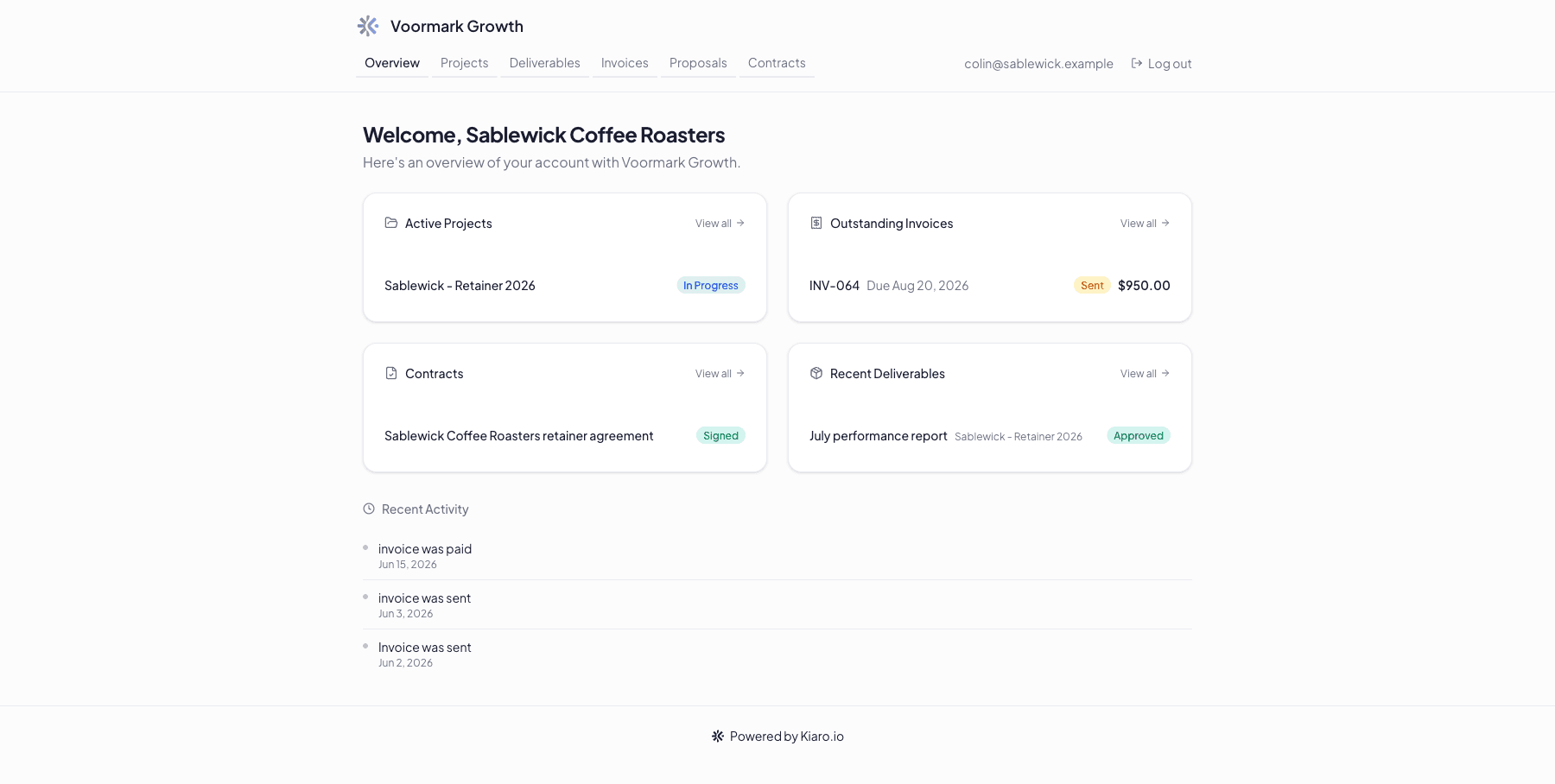
“Kiaro has helped me streamline processes, organise myself, time record my work and properly price work for future projects. I also no longer have to chase invoices, something I hated doing. Now Kiaro automates this for me. It's top shelf for business owners, and priced very reasonably.”

“My small consultancy looks more professional and organised. I do all my admin in one place and don't need to switch between different tools.”

The tools you keep
Plays nicely with your accountant's books.
Connect Kiaro to your accounting platform so every invoice you send lands in your books automatically. No CSV exports. No copy-paste.

Xero
BetaPush invoices and contacts to Xero on send, and keep payments, refunds, and voided invoices in sync both ways. Get the Kiaro invoice flipped to paid the moment it's reconciled in your books, even when the client paid by bank transfer.
Beta: limited to 25 organisations while we complete Xero App Partner certification. QuickBooks Online up next. See what's on the roadmap.
The command bar
Type what you need. Kiaro handles the rest.
The AI command bar understands plain English. Create projects, draft proposals, generate invoices, or ask “how much has Acme spent this quarter?” and get an answer, not a dashboard to squint at. And the moment you open Kiaro, Smart Suggestions surface what needs you first: overdue invoices, unbilled hours, and clients who have gone quiet.
- The Old Way
- ~15 minutes, 47 clicks
- The Kiaro Way
- ~10 seconds, 1 command
Invoice Halden & Co for last week’s hours
Staged plan · 1 action
Needs your OKCreate invoice from uninvoiced time entries
Inside Kiaro
Built for how you actually work.
Every feature is designed around the consulting lifecycle. Here are the ones that save the most time.
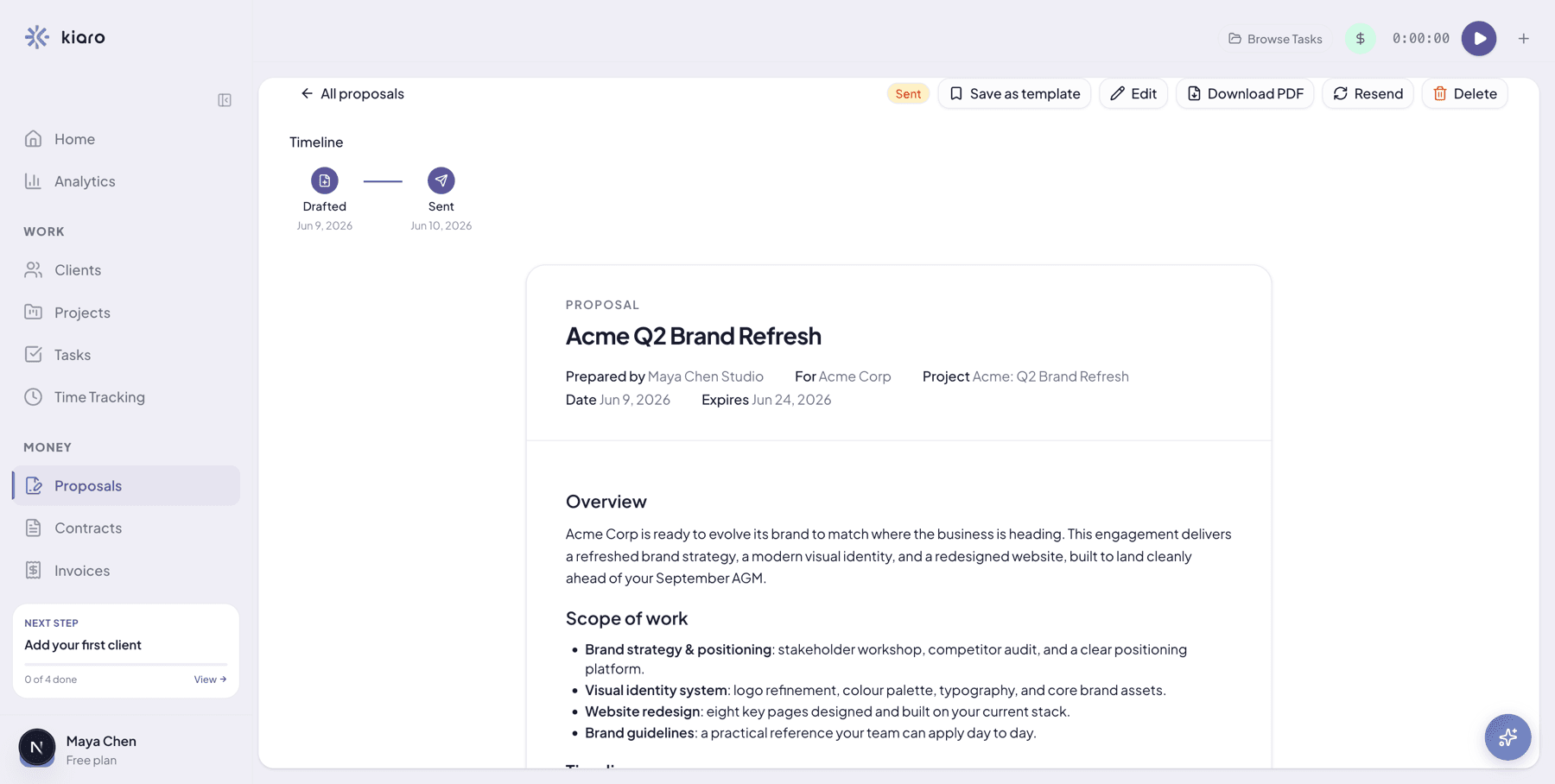
From blank page to signed proposal in minutes.
Describe the engagement and let AI draft a polished proposal matched to your writing style. Or start from one of five industry templates. Add structured pricing with optional line items, set an expiration date, and send it straight to your client.
- AI drafts proposals from your scope and budget
- Content library for reusable sections
- Branded PDF with cover page and pricing table
- Clients accept on a branded portal with digital audit trail
- Convert accepted proposals to projects with one click
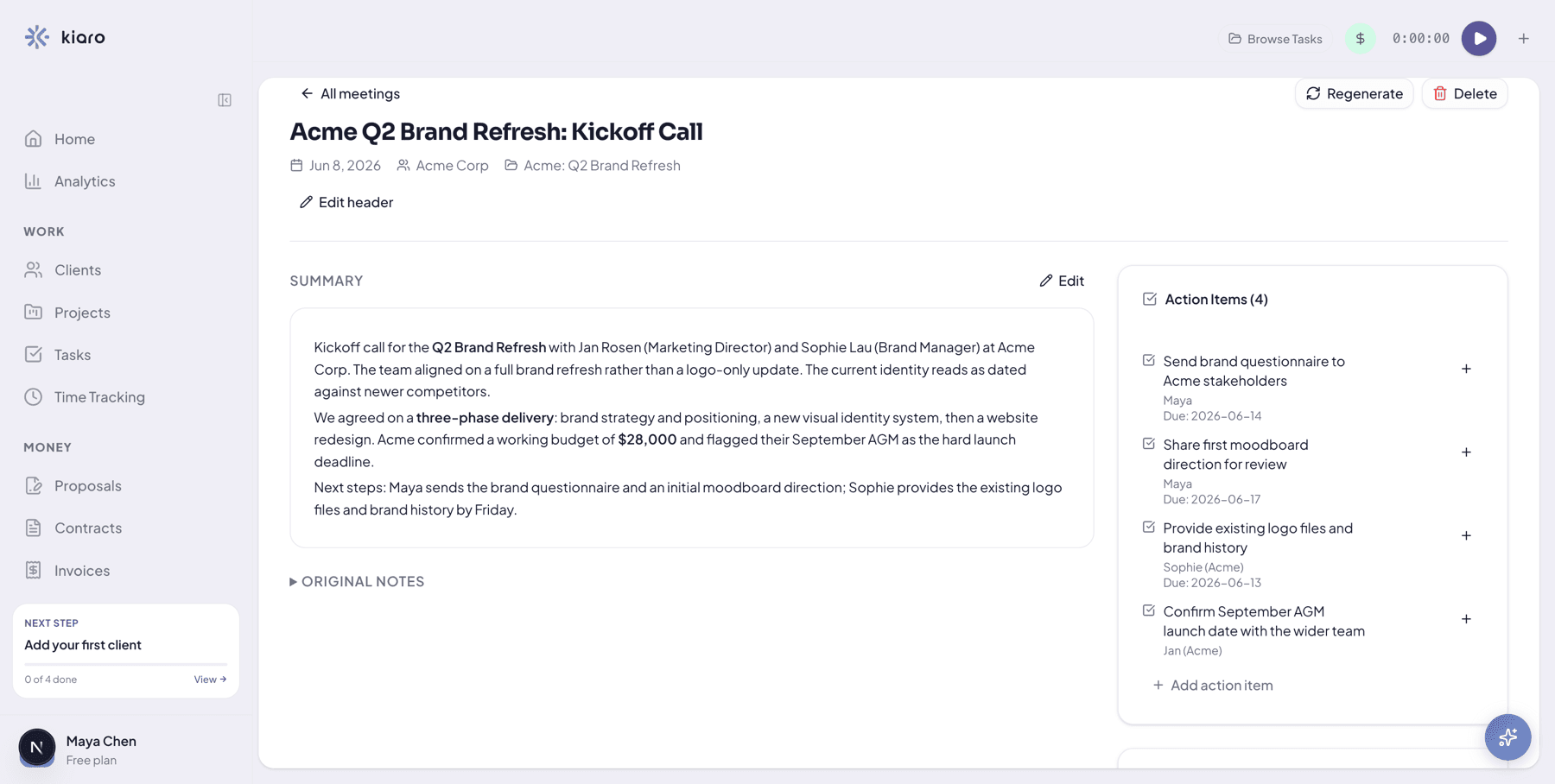
Paste your meeting notes. Get action items instantly.
Paste a transcript, upload a recording, or type quick notes from a call. AI extracts a structured summary, action items with owners and due dates, key decisions, and follow-ups. Convert any action item to a tracked task with one click.
- AI extracts summaries, decisions, and follow-ups
- Action items with assignees and due dates
- One-click conversion from action item to task
- Meeting context feeds into daily digest alerts
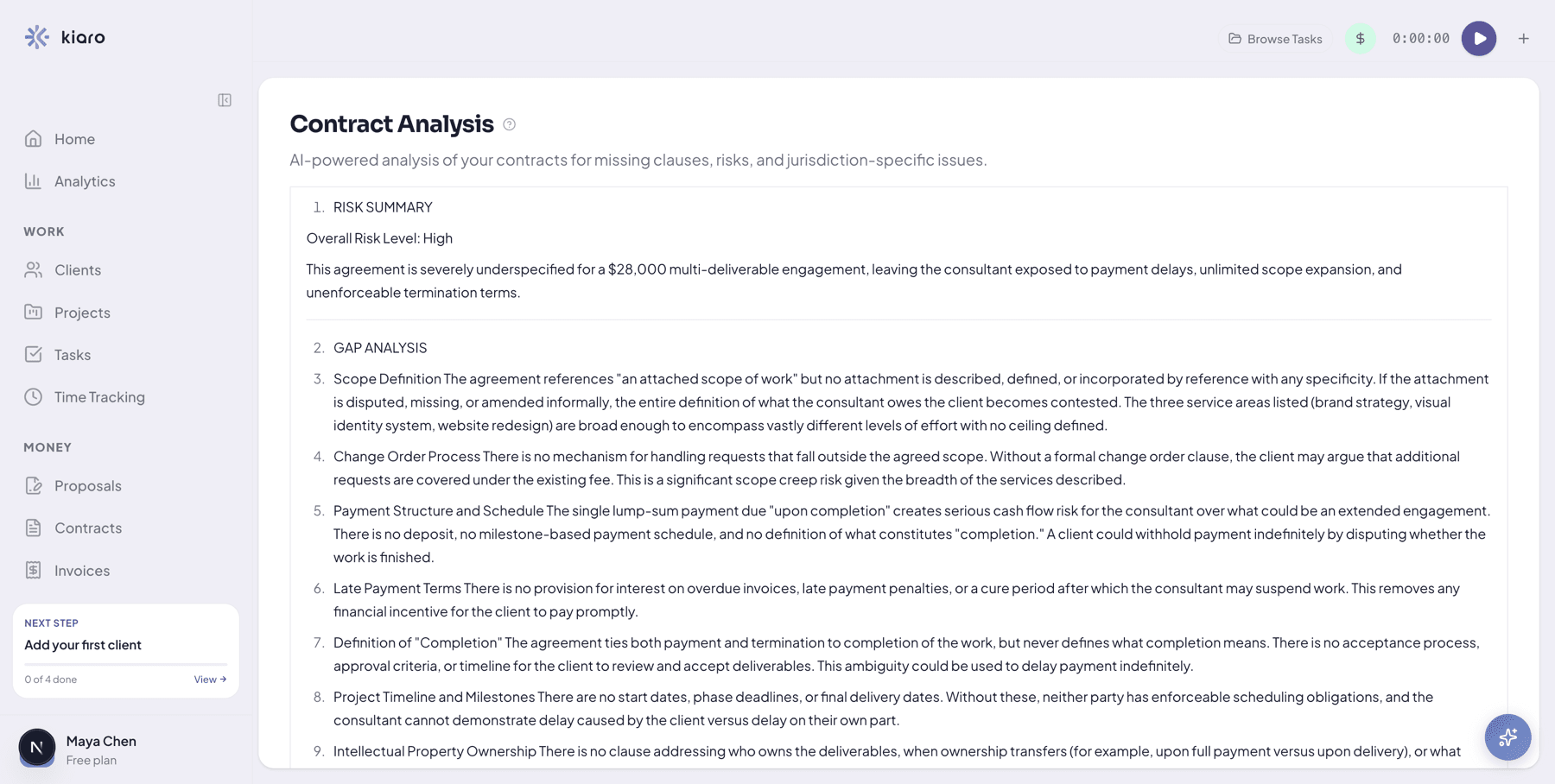
Understand the risks before signing.
Upload a contract or statement of work and get an instant AI review. Kiaro highlights missing clauses, unfavourable terms, and jurisdiction-specific considerations so you can ask the right questions before putting pen to paper.
- Risk summary with overall severity rating
- Gap analysis for missing or weak clauses
- Jurisdiction-aware when locations are provided
- Actionable checklist you can share with your lawyer
AI analysis is a starting point, not legal advice. Always consult a qualified professional before signing.
“If you'd rather do the actual work than drown in admin tasks, Kiaro might be for you. It connects every part of your consulting workflow in one place, without feeling overwhelming.”

Replace the stack
Replace your entire tool stack.
Most freelancers cobble together five apps to run their practice. Kiaro replaces the lot.
That's before counting the hours you save by not switching between them.
Pricing
Simple pricing. No surprises.
Start free. Upgrade when your practice outgrows it.
All plans include the full AI command bar, time tracking, invoicing, proposals, and knowledge base.
Free for your first 3 clients
- Up to 3 clients
- Unlimited invoices and retainers
- 100 AI commands/month
- Kiaro-branded invoices and portal
- Time tracking & invoicing
- 500 MB storage
For a busy solo practice
- White-label (your own brand)
- Xero accounting
- Unlimited clients & projects
- Unlimited AI commands
- Online payments via Stripe
- 100 GB storage
When you bring in help
- Everything in Solo
- Unlimited AI commands
- Per-seat billing ($29/seat/mo, 2 seat minimum)
- White-label portal
- 100 GB storage per seat
Compare all plans · No contracts, cancel anytime
Questions you're probably asking
Is the AI actually useful, or is it just a gimmick?
It's the primary interface. You can do everything manually, but most things are faster through the command bar. Type "invoice Acme for last month's hours" and it pulls your unbilled time, drafts the invoice, and waits for your go-ahead. It's not generating inspirational quotes. It's doing your admin.
Can I bill clients on a monthly retainer?
Yes, and retainers are unlimited on every plan, including Free. Set a flat monthly fee and an included-hours allowance per client. Kiaro tracks hours used against the allowance in real time, prices anything past the cap at your overage rate, and puts it on the same invoice. Invoices auto-draft on your billing day, in advance or in arrears, with mid-cycle proration handled. And if a retainer is pacing over its allowance, Kiaro flags it before the period closes, while there's still time to talk about scope.
How do proposals work?
You can create proposals from scratch, pick from five industry templates, or let AI draft one based on your scope and budget. Every proposal includes structured pricing with optional line items. Send it to your client and they can review, accept, or decline through a branded portal page. Once accepted, convert it to a project with one click. The budget carries over automatically.
What can my clients see in the portal?
The client portal is a branded hub with a dashboard, projects, deliverables, proposals, contracts, invoices, and an activity feed. You control exactly which sections each client can see. Your tasks, time entries, and knowledge base stay completely private. Clients access the portal through a magic link. No account to create, no password to remember.
Is my data secure?
Every workspace is fully isolated with tenant-scoped data access. When you use AI features, your data is processed by AI providers (Anthropic, OpenAI, Google) but is never used to train their models. Sensitive fields like email addresses and financial details are stripped before being sent to AI. All connections are encrypted, and you can export or delete your data at any time.
Does Kiaro replace my accounting software?
Kiaro covers invoicing and payments, not bookkeeping or tax filing. It works alongside whatever accounting tool you or your accountant already use.
What happens to my data if I cancel?
You can export everything at any time: clients, projects, invoices, time entries, and knowledge base entries. Your data belongs to you. If you cancel a paid plan, your workspace drops to the Free plan at the end of your billing period. Nothing is deleted.
Can I use Kiaro without the AI?
Absolutely. Every feature (clients, projects, tasks, invoicing, time tracking) is fully accessible through the traditional interface. The AI command bar is the fastest way to get things done, but you never have to use it. You can even disable AI entirely in workspace settings.
Why not just use Asana, Trello, or Basecamp?
Those tools are designed for internal team collaboration, not client-facing service delivery. They don't handle invoicing, proposals, contracts, or payments. And when you invite a client as a guest, they see your task boards and internal structure. With Kiaro, your client gets a clean portal showing only what matters to them: project status, deliverables, invoices, and proposals. No account to create, no tool to learn. One platform instead of juggling three or four.
Start today
You've got better things to do than admin.
Kiaro gives you back the hours you lose to tool-juggling, invoice-chasing, and proposal-writing. Start free with 3 clients and see if it fits how you work.
Start free, no card requiredFree on 3 clients with no time limit. Upgrade only when your practice outgrows it.